> ## Documentation Index
> Fetch the complete documentation index at: https://docs.kodus.io/llms.txt
> Use this file to discover all available pages before exploring further.
# Kodus CLI
> AI-powered code review, business validation, and agent workflows — from your terminal.
Kodus CLI reviews your code changes directly from the terminal — catching bugs, security issues, and style violations before they reach a pull request. It's the same Kodus engine that runs on your PRs, but pointed at your working tree, staged diff, branch, or commit.
## Who it's for
* **Solo developers** running a pre-commit check before pushing.
* **Teams** wanting a shared review ruleset across every clone, IDE, and CI job — without each developer signing in.
* **AI coding agents** (Claude Code, Cursor, Codex, Windsurf) running review-fix loops with structured output.
* **CI/CD pipelines** failing builds on issues above a severity threshold.
## What it looks like
Running `kodus review` against a working tree change produces a structured report: files affected, issues grouped by severity, suggested fixes you can preview and apply, and an exit code safe for scripting.
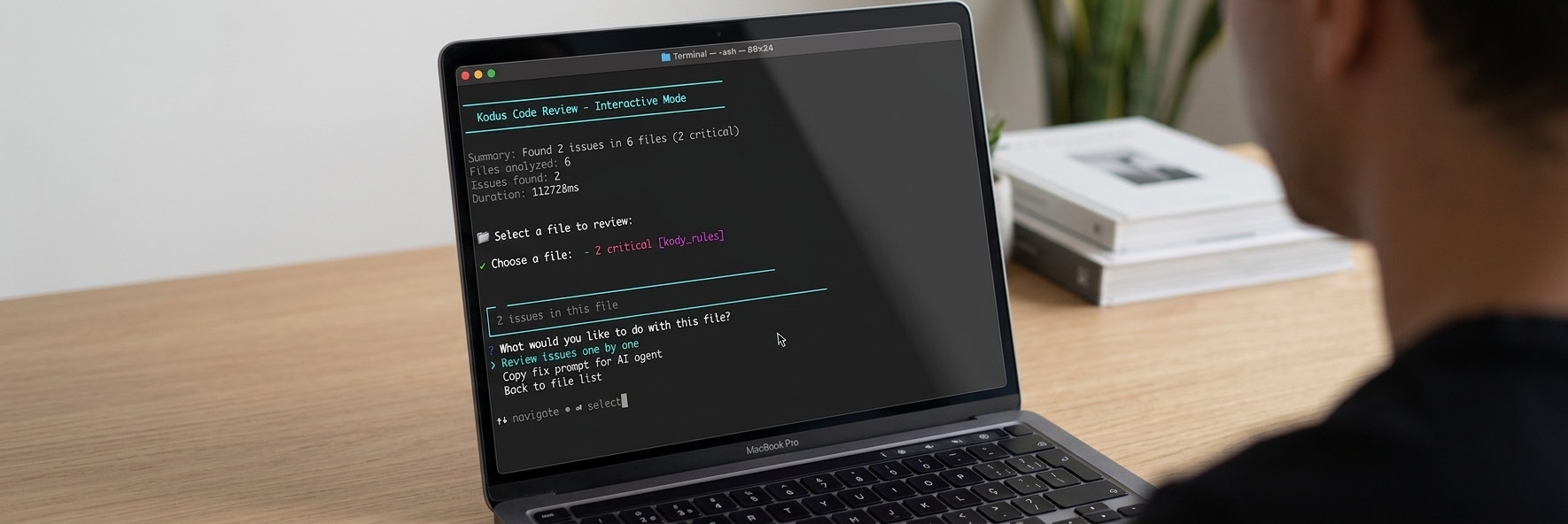 In `--prompt-only` mode the same review becomes compact, structured text optimized for an AI agent to parse and act on.
## What you can do
Browse files, preview fixes, and apply them one by one from your terminal.
Apply every fixable issue at once with `--fix`.
Feed `--prompt-only` output into Claude Code, Cursor, or Windsurf for autonomous review-fix loops.
Block pushes on issues above a severity threshold with `kodus hook install`.
Fetch Kody's suggestions on an open pull request without leaving your terminal.
Validate that a local diff satisfies a task's acceptance criteria before merging.
Create, update, and review team rules that the AI applies during every review.
Persist AI agent decisions as structured files versioned alongside your code.
## Limits
| | Trial (No Account) | Authenticated |
| ---------------------- | ------------------ | ------------------ |
| Reviews per day | 5 | Based on your plan |
| Files per review | 10 | 100 |
| Lines per file | 500 | — |
| Max diff size per file | 500 KB | 500 KB |
| Max content per file | 2 MB | 2 MB |
Trial limits reset daily. Run `kodus auth status` to check your current usage.
## CLI vs Kodus Web
The CLI and the Kodus web dashboard share the same review engine, rules, and repository settings. Use the CLI when you want reviews **before the PR exists** — on a local branch, a staged diff, or inside an agent loop. Use the web dashboard for PR reviews, metrics, and team-level configuration.
Changes you make via `kodus config repo` and `kodus rules` apply to both surfaces.
## Next steps
Install, authenticate, and run your first review.
All commands, flags, and options.
Set up autonomous review-fix loops with coding agents.
Connect the CLI to your own Kodus instance.
Common errors, exit codes, and how to debug.
In `--prompt-only` mode the same review becomes compact, structured text optimized for an AI agent to parse and act on.
## What you can do
Browse files, preview fixes, and apply them one by one from your terminal.
Apply every fixable issue at once with `--fix`.
Feed `--prompt-only` output into Claude Code, Cursor, or Windsurf for autonomous review-fix loops.
Block pushes on issues above a severity threshold with `kodus hook install`.
Fetch Kody's suggestions on an open pull request without leaving your terminal.
Validate that a local diff satisfies a task's acceptance criteria before merging.
Create, update, and review team rules that the AI applies during every review.
Persist AI agent decisions as structured files versioned alongside your code.
## Limits
| | Trial (No Account) | Authenticated |
| ---------------------- | ------------------ | ------------------ |
| Reviews per day | 5 | Based on your plan |
| Files per review | 10 | 100 |
| Lines per file | 500 | — |
| Max diff size per file | 500 KB | 500 KB |
| Max content per file | 2 MB | 2 MB |
Trial limits reset daily. Run `kodus auth status` to check your current usage.
## CLI vs Kodus Web
The CLI and the Kodus web dashboard share the same review engine, rules, and repository settings. Use the CLI when you want reviews **before the PR exists** — on a local branch, a staged diff, or inside an agent loop. Use the web dashboard for PR reviews, metrics, and team-level configuration.
Changes you make via `kodus config repo` and `kodus rules` apply to both surfaces.
## Next steps
Install, authenticate, and run your first review.
All commands, flags, and options.
Set up autonomous review-fix loops with coding agents.
Connect the CLI to your own Kodus instance.
Common errors, exit codes, and how to debug.