> ## Documentation Index
> Fetch the complete documentation index at: https://docs.kodus.io/llms.txt
> Use this file to discover all available pages before exploring further.
# Rules File Detection
> Automatically detect and import your existing rule files from popular AI coding tools to enhance Kody's code review capabilities with your team's established coding standards.
Kodus can automatically sync and import your existing IDE rule files to enhance Kody's code review with your team's established coding standards and preferences.
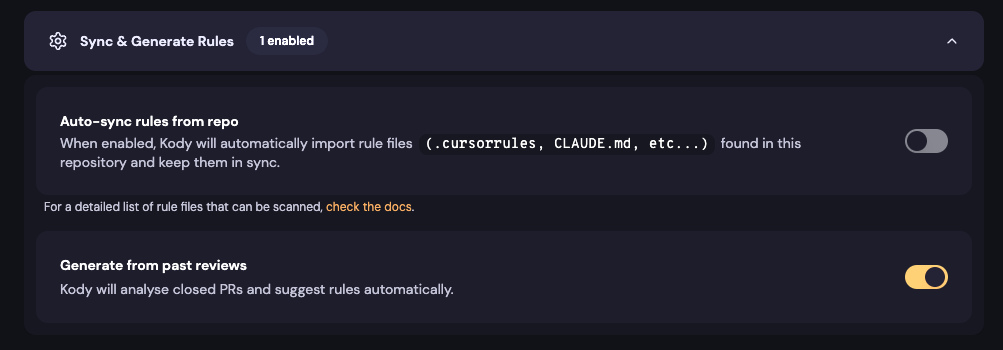 ## What is Rules File Detection?
Rules File Detection automatically detects and imports configuration files from popular AI coding tools and assistants in your repository. This ensures Kody understands and respects your existing coding standards without requiring manual setup.
## Supported Rule Files
Kodus automatically detects and imports the following rule file patterns:
### Cursor
* `.cursorrules` - Main Cursor rules file (legacy)
* `.cursor/rules/**/*.mdc` - Cursor rules in subdirectories
### GitHub Copilot
* `.github/copilot-instructions.md` - Copilot instructions
* `.github/instructions/**/*.instructions.md` - Detailed instruction files
### Agentic (agents.md convention)
* `AGENTS.md` - The de-facto standard agent guidance file
* `.agents.md` / `.agent.md` - Dotfile variants
### Claude
* `CLAUDE.md` - Claude-specific rules
* `.claude/settings.json` - Claude configuration settings
### Windsurf
* `.windsurfrules` - Windsurf IDE rules
### Sourcegraph Cody
* `.sourcegraph/**/*.rule.md` - Cody rule files
### OpenCode
* `.opencode.json` - OpenCode configuration
### Aider
* `.aider.conf.yml` - Aider configuration
* `.aiderignore` - Aider ignore patterns
### Generic/Internal Rules
* `.rules/**/*` - Generic rules directory
* `.kody/rules/**` and `rules/**/*.md` - Kody-specific rules (see [Repository Rules](/how_to_use/en/code_review/configs/repository_rules) — these are imported verbatim, without LLM rewriting)
* `docs/coding-standards/**/*` - Documentation-based coding standards
### Detection details
* **Nested files are discovered.** Every pattern above is matched at the repository root **and under any subdirectory**. A `services/billing/CLAUDE.md` is imported and automatically scoped to `services/billing/**` — per-directory guidance files (the common monorepo convention) work out of the box.
* **Matching is case-insensitive.** `claude.md` and `CLAUDE.md` are equivalent.
* **`@file` references are followed.** If a rule file references another file with the standard `@` convention (e.g. `@AGENTS.md` inside `CLAUDE.md`), the referenced file's content is fetched and included during import (one level deep, up to 5 references per file, 100KB per referenced file).
* **Multiple globs per rule are supported.** A rule path like `app/**/*.rb,lib/**/*.rb` (or a `path: []` list in [Repository Rules](/how_to_use/en/code_review/configs/repository_rules) frontmatter) applies the rule to files matching **any** of the globs.
## How It Works
### Initial Setup
1. **Enable Auto-sync**: Toggle the "Auto-sync rules from repo" option in your settings
2. **First Sync Modal**: A modal will appear asking if you want to sync for the first time
3. **Repository Scan**: When you confirm, Kodus scans your entire repository for supported rule files
4. **Rule Generation**: An LLM processes the found files and automatically creates corresponding Kody Rules. Exception: `.kody/rules/**` and `rules/**/*.md` template files are imported **verbatim** — no LLM conversion — so your instructions, examples and identifiers are preserved exactly as authored.
Each imported file produces **one Kody Rule**. If a file contains several distinct guidelines, the LLM merges them into a single comprehensive rule — split guidance across multiple files when you want independently manageable rules.
### Ongoing Synchronization
* **Automatic Updates**: Sync happens automatically when a Pull Request is closed
* **File Changes Detected**:
* **New rule files** → Creates new Kody Rules
* **Modified rule files** → Updates existing Kody Rules
* **Deleted rule files** → Removes corresponding Kody Rules
### Manual Sync (Toggle Disabled)
You can sync individual rule files without enabling auto-sync:
1. Add `@kody-sync` anywhere in your rule file
2. Commit the change
3. Kody will sync only that specific file
This lets you selectively sync rules without enabling automatic synchronization for all files.
If you manually edit a Kody Rule that was created from an IDE rule file, your changes will be overwritten the next time the corresponding file is modified and synced.
## Verifying sync and rule evaluation (self-hosted)
On self-hosted deployments the API logs carry grep-able markers for debugging:
* `[kody-rules-sync]` — per-run sync summary: which files were imported, skipped (with the reason) or removed.
* `[kody-rules-eval]` — per-file evaluation trace during a review: exactly which rules (uuid + title) were selected into the prompt for each reviewed file.
```bash theme={null}
docker logs kodus_api 2>&1 | grep "kody-rules-sync"
docker logs kodus_api 2>&1 | grep "kody-rules-eval"
```
If a rule shows as active in the UI but never appears in `[kody-rules-eval]` for the files you expect, check its **Path** glob — a rule only runs on files matching its path.
## Rule limits
Self-hosted instances running **without a valid license** (Community Edition) evaluate at most **10 rules** per review (oldest first). Licensed self-hosted and cloud instances have no such limit. If rules beyond the 10th silently don't fire on an unlicensed instance, this limit is why.
## What is Rules File Detection?
Rules File Detection automatically detects and imports configuration files from popular AI coding tools and assistants in your repository. This ensures Kody understands and respects your existing coding standards without requiring manual setup.
## Supported Rule Files
Kodus automatically detects and imports the following rule file patterns:
### Cursor
* `.cursorrules` - Main Cursor rules file (legacy)
* `.cursor/rules/**/*.mdc` - Cursor rules in subdirectories
### GitHub Copilot
* `.github/copilot-instructions.md` - Copilot instructions
* `.github/instructions/**/*.instructions.md` - Detailed instruction files
### Agentic (agents.md convention)
* `AGENTS.md` - The de-facto standard agent guidance file
* `.agents.md` / `.agent.md` - Dotfile variants
### Claude
* `CLAUDE.md` - Claude-specific rules
* `.claude/settings.json` - Claude configuration settings
### Windsurf
* `.windsurfrules` - Windsurf IDE rules
### Sourcegraph Cody
* `.sourcegraph/**/*.rule.md` - Cody rule files
### OpenCode
* `.opencode.json` - OpenCode configuration
### Aider
* `.aider.conf.yml` - Aider configuration
* `.aiderignore` - Aider ignore patterns
### Generic/Internal Rules
* `.rules/**/*` - Generic rules directory
* `.kody/rules/**` and `rules/**/*.md` - Kody-specific rules (see [Repository Rules](/how_to_use/en/code_review/configs/repository_rules) — these are imported verbatim, without LLM rewriting)
* `docs/coding-standards/**/*` - Documentation-based coding standards
### Detection details
* **Nested files are discovered.** Every pattern above is matched at the repository root **and under any subdirectory**. A `services/billing/CLAUDE.md` is imported and automatically scoped to `services/billing/**` — per-directory guidance files (the common monorepo convention) work out of the box.
* **Matching is case-insensitive.** `claude.md` and `CLAUDE.md` are equivalent.
* **`@file` references are followed.** If a rule file references another file with the standard `@` convention (e.g. `@AGENTS.md` inside `CLAUDE.md`), the referenced file's content is fetched and included during import (one level deep, up to 5 references per file, 100KB per referenced file).
* **Multiple globs per rule are supported.** A rule path like `app/**/*.rb,lib/**/*.rb` (or a `path: []` list in [Repository Rules](/how_to_use/en/code_review/configs/repository_rules) frontmatter) applies the rule to files matching **any** of the globs.
## How It Works
### Initial Setup
1. **Enable Auto-sync**: Toggle the "Auto-sync rules from repo" option in your settings
2. **First Sync Modal**: A modal will appear asking if you want to sync for the first time
3. **Repository Scan**: When you confirm, Kodus scans your entire repository for supported rule files
4. **Rule Generation**: An LLM processes the found files and automatically creates corresponding Kody Rules. Exception: `.kody/rules/**` and `rules/**/*.md` template files are imported **verbatim** — no LLM conversion — so your instructions, examples and identifiers are preserved exactly as authored.
Each imported file produces **one Kody Rule**. If a file contains several distinct guidelines, the LLM merges them into a single comprehensive rule — split guidance across multiple files when you want independently manageable rules.
### Ongoing Synchronization
* **Automatic Updates**: Sync happens automatically when a Pull Request is closed
* **File Changes Detected**:
* **New rule files** → Creates new Kody Rules
* **Modified rule files** → Updates existing Kody Rules
* **Deleted rule files** → Removes corresponding Kody Rules
### Manual Sync (Toggle Disabled)
You can sync individual rule files without enabling auto-sync:
1. Add `@kody-sync` anywhere in your rule file
2. Commit the change
3. Kody will sync only that specific file
This lets you selectively sync rules without enabling automatic synchronization for all files.
If you manually edit a Kody Rule that was created from an IDE rule file, your changes will be overwritten the next time the corresponding file is modified and synced.
## Verifying sync and rule evaluation (self-hosted)
On self-hosted deployments the API logs carry grep-able markers for debugging:
* `[kody-rules-sync]` — per-run sync summary: which files were imported, skipped (with the reason) or removed.
* `[kody-rules-eval]` — per-file evaluation trace during a review: exactly which rules (uuid + title) were selected into the prompt for each reviewed file.
```bash theme={null}
docker logs kodus_api 2>&1 | grep "kody-rules-sync"
docker logs kodus_api 2>&1 | grep "kody-rules-eval"
```
If a rule shows as active in the UI but never appears in `[kody-rules-eval]` for the files you expect, check its **Path** glob — a rule only runs on files matching its path.
## Rule limits
Self-hosted instances running **without a valid license** (Community Edition) evaluate at most **10 rules** per review (oldest first). Licensed self-hosted and cloud instances have no such limit. If rules beyond the 10th silently don't fire on an unlicensed instance, this limit is why.