> ## Documentation Index
> Fetch the complete documentation index at: https://docs.kodus.io/llms.txt
> Use this file to discover all available pages before exploring further.
# Overview
> Track and manage unimplemented suggestions with the Kody Issues feature.
## Quick Overview
* **Auto-tracking**: Automatically captures unimplemented suggestions from closed PRs
* **Smart resolution**: Auto-resolves when suggestions are implemented in future PRs
* **Advanced filtering**: Save custom views by status, severity, and category
* **Zero setup**: Works automatically with your existing code review workflow
## What It Is
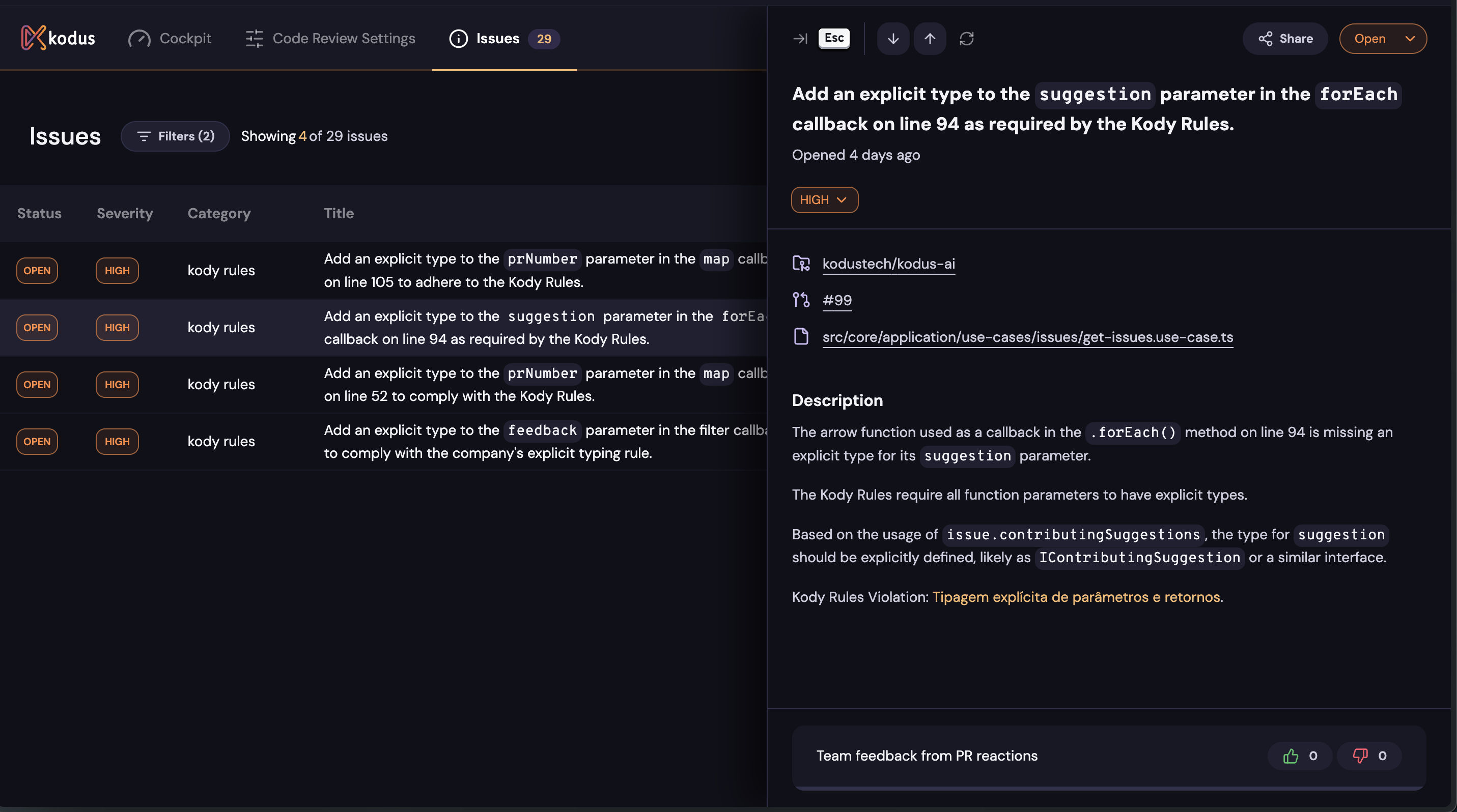
The **Kody Issues** feature automatically tracks all suggestions generated by Kody that were **not implemented** in your pull requests (PRs). It acts like a sonar, providing a live list of pending improvements to ensure you never lose sight of critical feedback.
 ## Key Benefits
Always stay aware of outstanding improvements without manual tracking
Prioritize and address critical fixes efficiently with severity levels
Ensure vital suggestions don't fall through the cracks during development
Customize statuses and severities to fit your workflow perfectly
## How It Works
### 1. Issue Creation
Issues are only created when PRs are **closed** - not when they're opened or
during review.
Kody rules of type **PR** do not generate issues. Only file-level and code-specific suggestions create trackable issues.
* When a PR is **closed**, Kody compiles all suggestions made in that PR that were **not applied**
* For each unimplemented suggestion, Kody automatically creates an **Issue** linked to the repository
* Each issue includes the original suggestion context, file location, and severity level
### 2. Automatic Resolution
* If a developer implements the suggested change in a **subsequent PR**, Kody marks the associated Issue as **Resolved**
* Kody intelligently matches implemented changes to existing issues using code analysis
* Resolution happens automatically without manual intervention
### 3. Manual Management
#### Status Control
* **Open**: New issues requiring attention
* **Resolved**: Automatically marked when suggestions are implemented
* **Dismissed**: Manually marked when suggestions aren't relevant to your team
#### Severity Adjustment
* Each Issue has a severity level (`Critical`, `High`, `Medium`, `Low`)
* You can update severity levels at any time to reflect your team's priorities
* Use severity to focus on the most impactful improvements first
### 4. Advanced Filtering
Filters are powerful tools - save custom views to quickly access issues that
matter most to your workflow.
* **Status filters**: Open, Resolved, Dismissed
* **Severity filters**: Critical, High, Medium, Low
* **Category filters**: Security, Performance, Code Style, etc.
* **Repository filters**: Focus on specific projects
* **Save custom views**: Automatically apply your preferred filters
## Why It Matters
### For Development Teams
* **Never lose track** of important code improvements
* **Prioritize work** based on actual impact and severity
* **Learn patterns** from commonly dismissed vs. implemented suggestions
### For Engineering Managers
* **Track code quality** trends across repositories
* **Identify bottlenecks** in suggestion implementation
* **Measure improvement** in code review follow-through
## Best Practices
Schedule weekly team reviews of open issues to maintain code quality
momentum
Establish team standards for when to adjust issue severity levels
Create clear guidelines for when issues should be dismissed vs. implemented
## Next Steps
Configure custom rules that will be tracked as issues
Learn how Kody improves suggestions based on your team's feedback
## Key Benefits
Always stay aware of outstanding improvements without manual tracking
Prioritize and address critical fixes efficiently with severity levels
Ensure vital suggestions don't fall through the cracks during development
Customize statuses and severities to fit your workflow perfectly
## How It Works
### 1. Issue Creation
Issues are only created when PRs are **closed** - not when they're opened or
during review.
Kody rules of type **PR** do not generate issues. Only file-level and code-specific suggestions create trackable issues.
* When a PR is **closed**, Kody compiles all suggestions made in that PR that were **not applied**
* For each unimplemented suggestion, Kody automatically creates an **Issue** linked to the repository
* Each issue includes the original suggestion context, file location, and severity level
### 2. Automatic Resolution
* If a developer implements the suggested change in a **subsequent PR**, Kody marks the associated Issue as **Resolved**
* Kody intelligently matches implemented changes to existing issues using code analysis
* Resolution happens automatically without manual intervention
### 3. Manual Management
#### Status Control
* **Open**: New issues requiring attention
* **Resolved**: Automatically marked when suggestions are implemented
* **Dismissed**: Manually marked when suggestions aren't relevant to your team
#### Severity Adjustment
* Each Issue has a severity level (`Critical`, `High`, `Medium`, `Low`)
* You can update severity levels at any time to reflect your team's priorities
* Use severity to focus on the most impactful improvements first
### 4. Advanced Filtering
Filters are powerful tools - save custom views to quickly access issues that
matter most to your workflow.
* **Status filters**: Open, Resolved, Dismissed
* **Severity filters**: Critical, High, Medium, Low
* **Category filters**: Security, Performance, Code Style, etc.
* **Repository filters**: Focus on specific projects
* **Save custom views**: Automatically apply your preferred filters
## Why It Matters
### For Development Teams
* **Never lose track** of important code improvements
* **Prioritize work** based on actual impact and severity
* **Learn patterns** from commonly dismissed vs. implemented suggestions
### For Engineering Managers
* **Track code quality** trends across repositories
* **Identify bottlenecks** in suggestion implementation
* **Measure improvement** in code review follow-through
## Best Practices
Schedule weekly team reviews of open issues to maintain code quality
momentum
Establish team standards for when to adjust issue severity levels
Create clear guidelines for when issues should be dismissed vs. implemented
## Next Steps
Configure custom rules that will be tracked as issues
Learn how Kody improves suggestions based on your team's feedback