

What are MCPs?
Model Context Protocol (MCP) is an open standard that lets LLM apps connect to external tools and data sources through a consistent server interface. MCP servers publish tool schemas and endpoints so clients like Kodus/Kody can fetch context or run actions during a workflow.MCP Manager Architecture
MCP Manager is the backend service that brokers those MCP connections for Kodus. It keeps track of providers, integrations, and allowed tools per workspace, then exposes that catalog to the Kodus API.- Central registry for MCP providers (Kodus and custom)
- Stores integration metadata (connection status, MCP URL, allowed tools)
- Handles provider-specific authentication flows and tool discovery
- Exposes APIs used by Kodus to list and invoke MCP tools
Plugins in Kodus
Everything registered in MCP Manager appears on the Kodus Plugins page (sidebar → Plugins), so your team can install, manage, and enable the MCPs available for each workspace. If the web app can’t reach MCP Manager (for example, it isn’t deployed), the Plugins item is hidden from the sidebar.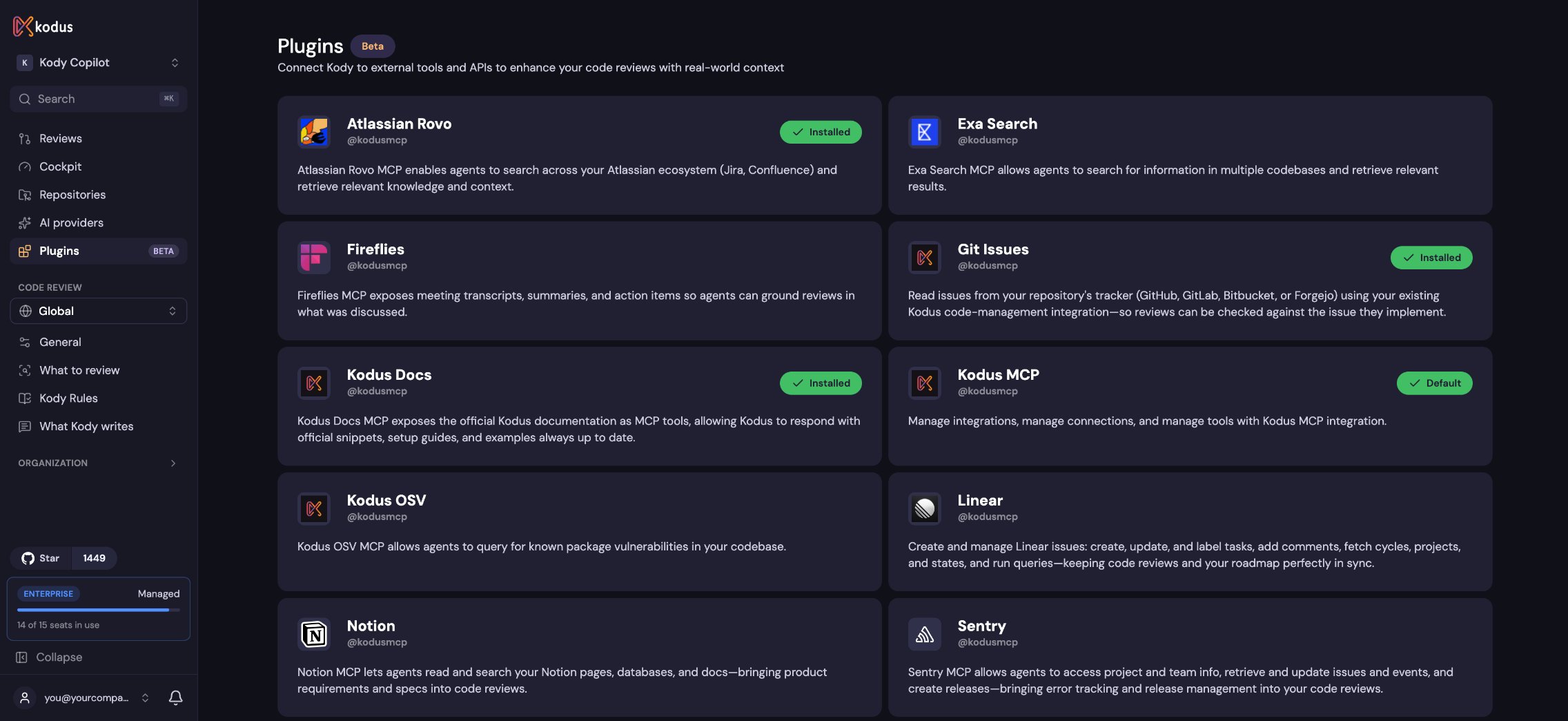
Providers
Kodus provider
The Kodus provider bundles first-party MCPs managed by Kodus, including the Kodus MCP, Context7 MCP, and Kodus Docs MCP.Custom providers
You can add custom providers to integrate internal systems or third-party platforms. In self-hosted deployments, list the provider inAPI_MCP_MANAGER_MCP_PROVIDERS, then implement the provider in the MCP Manager
codebase. The reference implementation lives here:
kodus-mcp-manager repo