

Quick Overview
- Auto-tracking: Automatically captures unimplemented suggestions from closed PRs
- Smart resolution: Auto-resolves when suggestions are implemented in future PRs
- Advanced filtering: Filter by status, severity, category, and more, and save your default filters
- Zero setup: Works automatically with your existing code review workflow (turn it off with the Auto-create issues switch)
What It Is
The Kody Issues feature automatically tracks all suggestions generated by Kody that were not implemented in your pull requests (PRs). It acts like a sonar, providing a live list of pending improvements to ensure you never lose sight of critical feedback. Issues isn’t a sidebar item: open it from the Issues tab in the Cockpit (it shows the open-issue count), or search for Issues in the ⌘K command palette (the way in when your plan doesn’t include the Cockpit). The list shows Status, Severity, Category, Title, Repository, File, Age, and #PR(s), filtered to open issues by default. Click a row to open the issue’s detail panel, where you can change its status and severity, step through issues with J / K, Share a link, and see Team feedback from PR reactions. The Auto-create issues switch at the top right of the page turns automatic issue creation on or off for the workspace (on by default).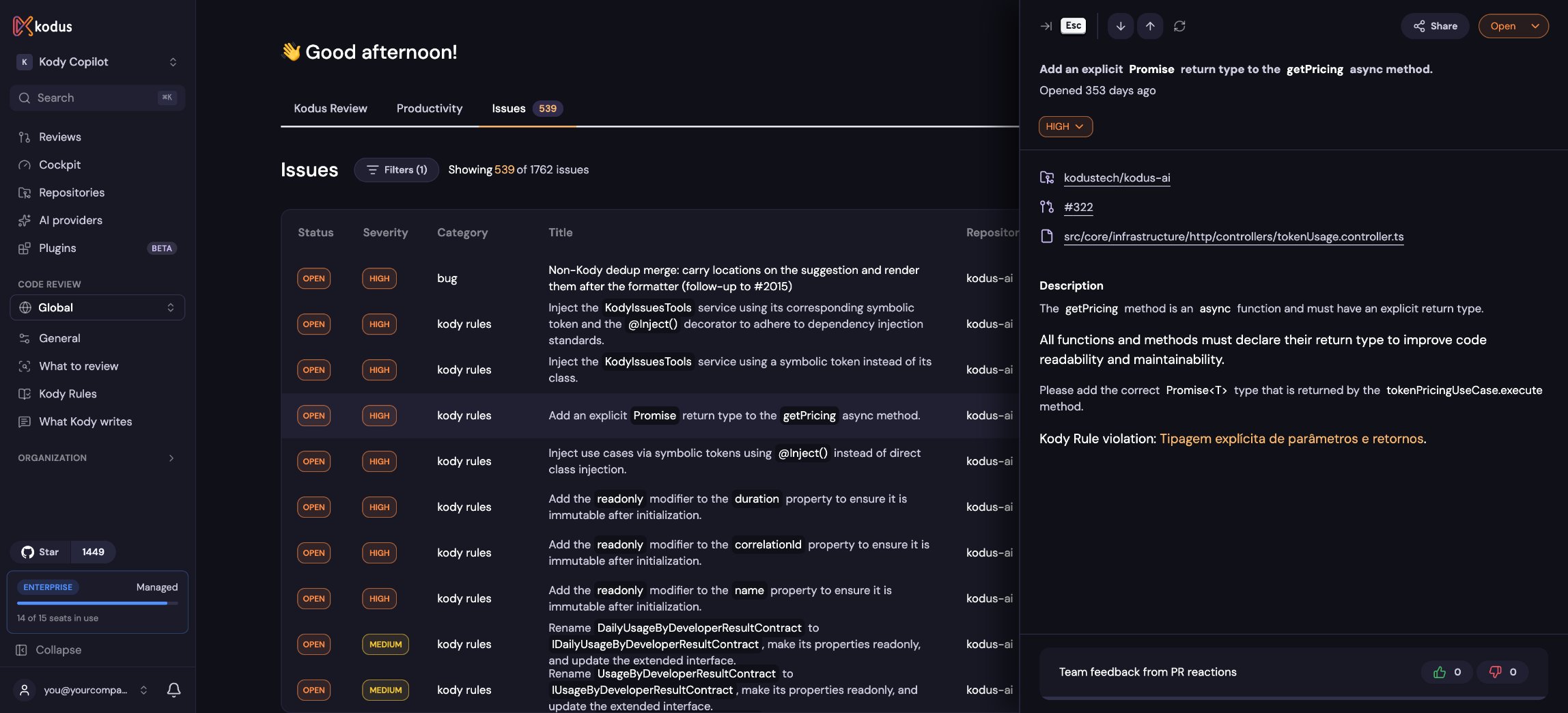
Kody Issues dashboard showing tracked suggestions with filters and status management
Key Benefits
Continuous Visibility
Always stay aware of outstanding improvements without manual tracking
Quality Tracking
Prioritize and address critical fixes efficiently with severity levels
Error Prevention
Ensure vital suggestions don’t fall through the cracks during development
Team Flexibility
Customize statuses and severities to fit your workflow perfectly
How It Works
1. Issue Creation
Issues are only created when PRs are closed - not when they’re opened or
during review.
- When a PR is closed, Kody compiles all suggestions made in that PR that were not applied
- For each unimplemented suggestion, Kody automatically creates an Issue linked to the repository
- Each issue includes the original suggestion context, file location, and severity level
2. Automatic Resolution
- If a developer implements the suggested change in a subsequent PR, Kody marks the associated Issue as Resolved
- Kody intelligently matches implemented changes to existing issues using code analysis
- Resolution happens automatically without manual intervention
3. Manual Management
Status Control
- Open: New issues requiring attention
- Resolved: Automatically marked when suggestions are implemented
- Dismissed: Manually marked when suggestions aren’t relevant to your team
Severity Adjustment
- Each Issue has a severity level (
Critical,High,Medium,Low) - You can update severity levels at any time to reflect your team’s priorities
- Use severity to focus on the most impactful improvements first
4. Advanced Filtering
Open Filters at the top of the list (the button shows how many are active):- Status filters: Open, Resolved, Dismissed
- Severity filters: Critical, High, Medium, Low
- Category filters: Security, Performance, Code Style, etc.
- Repository filters: Focus on specific projects
- Title, file path, and PR numbers: Narrow down to specific issues
- Set as default filters: Automatically apply your preferred filters each time you open Issues in this browser (Reset to default filters brings them back)
Why It Matters
For Development Teams
- Never lose track of important code improvements
- Prioritize work based on actual impact and severity
- Learn patterns from commonly dismissed vs. implemented suggestions
For Engineering Managers
- Track code quality trends across repositories
- Identify bottlenecks in suggestion implementation
- Measure improvement in code review follow-through
Best Practices
Regular Review Sessions
Schedule weekly team reviews of open issues to maintain code quality
momentum
Severity Guidelines
Establish team standards for when to adjust issue severity levels
Dismissal Criteria
Create clear guidelines for when issues should be dismissed vs. implemented
Next Steps
Kody Rules Setup
Configure custom rules that will be tracked as issues
Feedback on suggestions
Understand what feedback records and how to configure future reviews.