Use this if you want users to sign in to Kodus with GitHub. This is separate from the GitHub App integration used for code review automation and webhooks.

Prerequisites

  • WEB_DOMAIN: Your Frontend URL (e.g., https://app.yourdomain.com or http://localhost:3000)

Step 1: Create the OAuth App

  1. On GitHub, go to Settings > Developer Settings > OAuth Apps
  2. Click New OAuth App
  3. Fill in the basic information (Application name, Homepage URL)
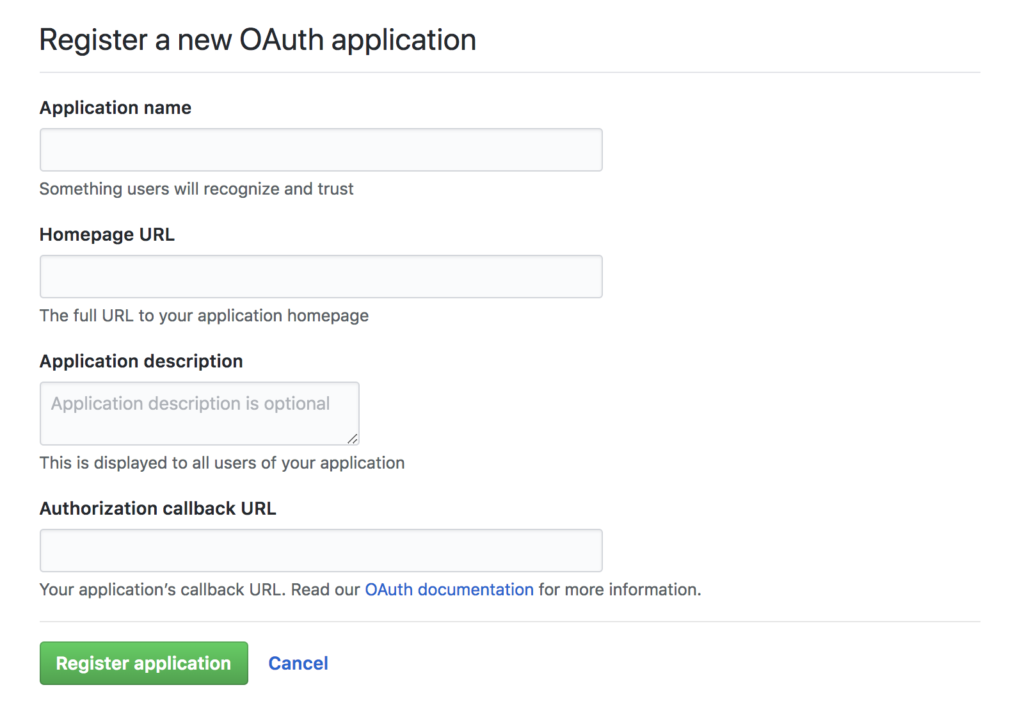
GitHub OAuth Apps page showing the new application form

Step 2: Configure the Callback URL

Set the Authorization callback URL to:
WEB_DOMAIN/api/auth/callback/github
Make sure the URL matches your actual web domain and scheme (http/https).

Step 3: Add Credentials to .env

After creating the app, copy the credentials from GitHub and add them to your Kodus environment:
WEB_OAUTH_GITHUB_CLIENT_ID="your_client_id_here"
WEB_OAUTH_GITHUB_CLIENT_SECRET="your_client_secret_here"

Summary of Environment Variables

WEB_OAUTH_GITHUB_CLIENT_ID="your_client_id_here"
WEB_OAUTH_GITHUB_CLIENT_SECRET="your_client_secret_here"
Restart the web application to apply the changes.