

Who it’s for
- Solo developers running a pre-commit check before pushing.
- Teams wanting a shared review ruleset across every clone, IDE, and CI job — without each developer signing in.
- AI coding agents (Claude Code, Cursor, Codex, Windsurf) running review-fix loops with structured output.
- CI/CD pipelines failing builds on issues above a severity threshold.
What it looks like
Runningkodus review against a working tree change produces a structured report: files affected, issues grouped by severity, suggested fixes you can preview and apply, and an exit code safe for scripting.
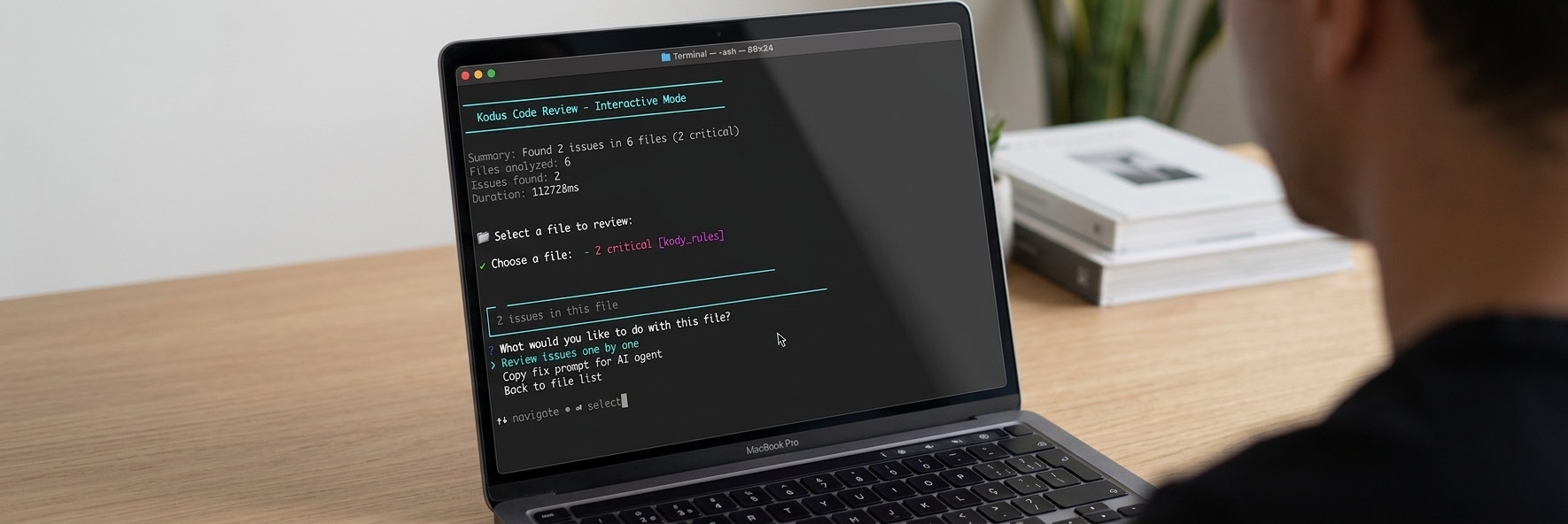
--prompt-only mode the same review becomes compact, structured text optimized for an AI agent to parse and act on.
What you can do
Interactive Review
Browse files, preview fixes, and apply them one by one from your terminal.
Auto-fix
Apply every fixable issue at once with
--fix.AI Agent Integration
Feed
--prompt-only output into Claude Code, Cursor, or Windsurf for autonomous review-fix loops.Pre-push Hook
Block pushes on issues above a severity threshold with
kodus hook install.PR Suggestions
Fetch Kody’s suggestions on an open pull request without leaving your terminal.
Business Validation
Validate that a local diff satisfies a task’s acceptance criteria before merging.
Kody Rules
Create, update, and review team rules that the AI applies during every review.
Limits
Trial limits reset daily. Run
kodus auth status to check your current usage.
CLI vs Kodus Web
The CLI and the Kodus web dashboard share the same review engine, rules, and repository settings. Use the CLI when you want reviews before the PR exists — on a local branch, a staged diff, or inside an agent loop. Use the web dashboard for PR reviews, metrics, and team-level configuration. Changes you make viakodus config repo and kodus rules apply to both surfaces.
Next steps
Getting Started
Install, authenticate, and run your first review.
Command Reference
All commands, flags, and options.
AI Agents
Set up autonomous review-fix loops with coding agents.
Self-Hosted
Connect the CLI to your own Kodus instance.
Troubleshooting
Common errors, exit codes, and how to debug.