

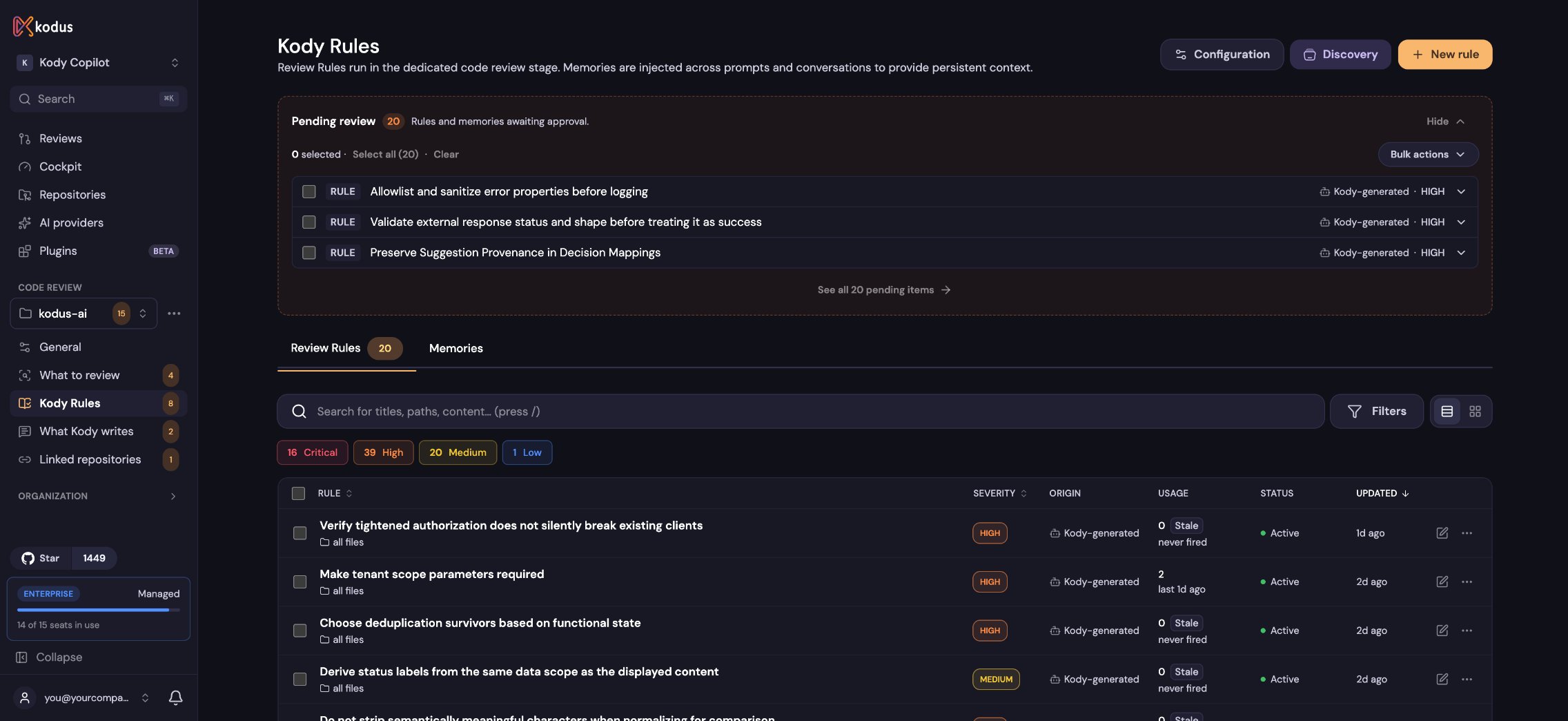
Code review → Kody Rules at repository scope: pending review, the Review Rules and Memories tabs, filters, and the rules table
Where to find them
Pick Global, a repository or a directory in the scope picker at the top of the Code review group, then open Kody Rules. Everything you create or change on the page applies to the scope you picked. See Rule Inheritance for how scopes combine. The header has three actions:- Configuration: how rules and memories get created and approved for this scope.
- Discovery: the Rules Library. Shown on the Review Rules tab.
- New rule (or New memory on the Memories tab).
Two types
- Review Rules
- Memories
Checks that run during code review and report violations as suggestions.
- Per file rules run once for each changed file and comment inline.
- Per PR rules run once for the whole pull request and post a single PR comment.
- Each rule has a severity and can be limited to paths.
Create a Review Rule
On the Review Rules tab, click New rule (Write a rule when the list is empty).
Severity decides how the finding is labeled. Whether findings below a severity are posted at all is set in Suggestion Control.
What Kody sees
- Per file: the file’s diff, the rest of the file when it is small enough, and the PR title and description (first 1,000 characters).
- Per PR: the PR title and description (first 1,000 characters), the list of changed files and the diff of every file. On very large PRs, files past the diff budget are listed by name only.
Reference files in a rule
Mention a file by path in the instructions, for example@file:docs/architecture.md, to give Kody its contents when it judges the rule.
- Kody finds file references when you save the rule. The status next to the editor shows when they are resolved, and any file it could not read.
- Files are read from the pull request’s target branch.
- Use the real path in the repository, not a placeholder.
Examples
- Per file
- Per PR
- Rule name: Avoid equality operators in loop termination conditions
- Path:
src/**/*.ts - Severity: Critical
- Instructions: Using
==or!=in a loop condition can cause infinite loops when the exact value is never hit.
Other ways to add rules
- Rules Library: add ready-made rules and packs with Discovery.
- Repository Rules: keep one rule per markdown file in your repository, in
.kody/rules. - Global Rule Sources: import rule files from a standards repository as global rules.
- Automatic Rules Generation: Kody drafts rules from your reviewers’ past comments.
- In a review thread: ask Kody to create, change or remove a rule, for example
@kody update this rule to ignore test files. Rules created this way show the MCP/Agent origin and wait in Pending review.
The rules list
The list shows the rules of the selected scope plus the ones inherited from higher scopes. Click a row to open the rule in a side panel, with Pause or Resume, Edit (View without edit permission) and delete. Use the table or card view switch next to the filters; the choice is remembered in your browser. Search looks at titles, paths, instructions and examples (press/ to focus it). The severity chips above the list filter by severity.
Filters lets you sort by recent update, severity or name, show or hide inherited rules and Disabled Rules, and filter by origin, by Has sync errors (rules whose referenced files could not be read) or by Paused only.
Origin
Status
Bulk actions
In the Review Rules tab, tick rules (or Select all visible) to Pause, Resume or Delete them together. Only the rules of the current scope can be selected, not inherited ones.Impact and usage
The side panel shows an Impact block for the last 30 days: how many times the rule fired, how many pull requests it fired on and its recent suggestions. Where the Cockpit is available (Teams and Enterprise plans, and trials), it also shows how many suggestions were implemented and the thumbs-up and thumbs-down feedback, and the table gets a Usage column. A chip marks rules that need attention:- Stale: did not fire in the last 30 days.
- Ignored: fired at least 5 times and 20% or fewer of its suggestions were implemented.
- Noisy: fired at least 5 times, with at least 3 thumbs-down, more thumbs-down than thumbs-up, and a thumbs-down on at least 10% of its suggestions.
Pause ignored and noisy rules
On Teams and Enterprise plans, Configuration → Pause ignored and noisy rules pauses, once a day, active rules in the scope that came out Ignored or Noisy over the last 30 days, including rules written by hand. They show Paused by Kody with the numbers behind it. Admins are notified and can Resume a rule at any time; after a resume, only what it flags later counts. Rules managed through a centralized config are not paused. It is off by default.Rule limits
Organizations on the cloud Free plan (or whose subscription was canceled or expired) and self-hosted instances without a valid license run at most 10 active rules per review, oldest first. The 10 count Global, repository and directory rules together, and memories count too. Rules beyond the limit stay in the list as Locked, are skipped on every PR, and a banner on the page says how many. Paid cloud plans and licensed self-hosted instances have no limit.Memories
A memory is a short statement Kody keeps in mind: how your system works, what the team has already decided. Memories help Kody avoid repeating wrong assumptions about your repository.- Memories are added to the context of code reviews and of conversations with Kody.
- When Kody is about to save a memory, it checks the existing ones and either creates it, skips it as a duplicate, or updates an existing memory.
Create a memory
In a PR comment. Ask Kody to remember something and it saves it:@kody yes to save it:
Kody does not save transient instructions (“fix this now”), debugging chatter, questions, vague statements, or requests that apply only to one task or PR.
Memory scopes
Approval
By default rules generated from past reviews, rules suggested during onboarding and memories Kody saves are active as soon as they are created. To review them first, open Configuration and turn on Kody knowledge approval. With approval on, these wait in Pending review until approved:- rules generated from past reviews or suggested during onboarding;
- memories Kody saves in a review thread;
- rules synced from a repository’s rule files. Rules imported through Global Rule Sources are active right away.
Pending review
A badge on the Review Rules and Memories tabs shows the pending count. The Pending review section (“Rules and memories awaiting approval.”) lists them together, each marked Rule, Memory or Update:- New rules and memories: Approve to activate or Discard to reject.
- Updates: a proposed change to an existing item, shown as a diff. Update existing applies it, Create new instead keeps the original and adds the proposal as a separate item, Discard rejects it.
Next steps
Rules Library
Add ready-made rules and packs.
Repository Rules
Keep rules in your repository as markdown files.
Coding-Agent Instructions
Let Kody check changes against CLAUDE.md, AGENTS.md, Cursor and Copilot instructions.